
The best nursery management software for UK nurseries (2026 guide)
Skip the reading?
Get a personalised demo based on your specific needs and priorities.
In brief:
- Traditional providers such as Famly and Ovivio, use bundled pricing with fixed tiers, often placing essential tools behind higher-cost plans.
- eyworks uses a flexible, grow-with-you approach. You get to choose the modules you need today and only pay for what you use.
- Connect Childcare’s core administration software requires a Windows desktop application. eyworks is entirely browser-based, so your team can access it instantly from any device.
- Famly, Connect Childcare and Ovivio don’t offer a native recruitment solution. eyworks includes eyrecruit, a dedicated applicant tracking system designed specifically for the early years sector.
- With tiered pricing, settings may need to move to a top-level package to access everyday tools such as staff rotas and progress checks. With eyworks, you’ll have full access to every feature included in your chosen module.
Why “all-in-one” is often a misnomer
- The bundled model: you choose from fixed pricing tiers. Features are grouped into different plans, so the tool you need may sit behind a higher price point. Even if you only want one tool, such as staff rotas or accident forms, you may have to pay for a higher tier to access it.
- The grow-with-you model: you choose the individual modules your nursery needs today, such as finance or observations, and add more only when you’re ready, without replacing what’s already working.
The five-point test before you sign a contract
| Non-negotiable | What it looks like when it's real | The trap to watch for |
|---|---|---|
| Built for UK early years, not adapted to it | EYFS, CfE, and other UK framework tracking mapped to the inspection areas, funded and unfunded hours split cleanly, Tax-Free Childcare handled inside how parents pay, SEND flags on a child's own profile, safer recruitment evidence as standard | A platform built for a different market or sector, where UK-specific rules were bolted on afterward rather than built in from day one |
| Priced for what you need today, not what you might need one day | You can clearly see which module or feature sits in. | A feature you'll use every week, such as rotas or accident forms, sits behind the most expensive tier in the range |
| Covers the staffroom, not just the classroom | HR, training, DBS tracking, and ideally recruitment itself, live inside the same system as observations and finance | A platform that manages your existing staff but doesn't track DBS checks or training expiry dates. Leaves you posting vacancies on job boards and chasing applicants through spreadsheets. |
| Holds up on a tablet mid-shift, not just in a demo | Practitioners can log an observation or accident form one-handed while staying focused on the children. It also works in areas with weak Wi-Fi, such as the garden or outdoor play area. | Software that looks slick on a laptop in a sales call and turns into three extra taps once someone's actually holding a toddler |
| Scales with you as your nursery grows | A new module, or a second site, can be added without retraining everyone on a different system from scratch. A change of software means disruption and retraining everyone on the new software. | A platform sized exactly for where you are today, which quietly becomes the reason you're shopping again in eighteen months |
This is the short version. For the full list of questions worth working through before you sign anything, including how to judge support and what a software switch actually costs your team, read how to choose a nursery management software for your UK nursery
A quick note on how we built this guide
We’re the team behind eyworks. We built our platform to tackle two common problems in the early years sector: rigid bundled pricing and software that treats recruitment as someone else’s problem. Full disclaimer: we’re not a neutral party here. What we can promise is honesty. If another provider is genuinely a better fit for your nursery, we’ll say so.
Every figure and feature claim below is drawn from publicly available pricing pages and product information. If you spot an inaccuracy, get in touch, and we’ll review it.
How we scored each platform
| Score | What it means |
|---|---|
| Strong (2 points) | Meets the test as standard, with nothing extra required |
| Partial (1 point) | Meets the test in part, or only once you commit to a higher tier, a separate tool, or a specific setup |
| Limited (0 points) | Doesn’t meet the test, or the gap is significant enough to change how your team would actually operate |
eyworks is the most flexible nursery management software
Who eyworks is built for:
- Single-site nursery owners – if you’re responsible for finance, staffing, and compliance yourself, you need one place to see all of it, without paying for a chain-scale platform you’ll never fully use. Start with the one or two modules solving today’s biggest headache, most often finance or observations, and build from there.
- Nursery managers – you’re balancing ratios, parent queries, and daily admin in real time. eyworks is built to reduce the time your team spends looking at a screen, not add to it, because the tools that matter most to you (rotas, ratio visibility, daily diaries) are standard, not gated behind a premium tier.
- Multi-site group directors and operations leads – you need consistency across every setting and oversight without extra admin layered on top. Because every module is deeply integrated, you get group-level reporting and site-level flexibility without forcing every setting into the same rigid configuration on day one.
What's actually inside eyworks
- eymanage brings child scheduling, occupancy planning and invoicing together in one practical system. It clearly separates funded and unfunded hours, helps you manage staff rotas and ratios, and gives families flexible ways to pay, including Tax-Free Childcare.
- eylog is our online learning journal. It supports common UK frameworks like EYFS, Birth to 5 Matters, and CfE, and provides a framework builder so you can add your own curriculum (including Montessori and CoEL). You can record daily diaries, observations and assessments digitally, complete statutory Two-Year Progress Checks, and manage accident and medication forms in one place. It can also help you run trend analysis reports to spot patterns across recorded incidents.
- eyenquiries manages parent enquiries from first contact through to enrolment. It includes waiting list and pipeline stage management and analytics showing where enquiries convert.
- eypeople is an HR system built specifically for early years. It holds a single central record per staff member, tracks DBS and right-to-work documents. It flags qualification and training expiry dates automatically and handles contract entitlement, absence, TOIL, and overtime.
- eyrecruit is a dedicated applicant tracking system built for the early years sector. It posts vacancies automatically to multiple boards, including Indeed and GOV.UK. It gives you a visual candidate pipeline and builds the safer recruitment evidence trail as candidates move from applied to hired. You can also build a talent pool of strong runners-up you may want to stay in touch with.
- eyengage is our nursery newsfeed for sharing posts and polls with parents and staff at the nursery, region or whole-group level.
- eyparent and eyemployee are our free apps for families and staff. They give each group direct access to the parts of eyworks that matter most to them.
- eypay brings parent payments (card, Direct Debit, Apple Pay, Google Pay, and Tax-Free Childcare) directly into eymanage. It automatically pulls your bank feed into eymanage so you don’t have to manually download and upload CSVs. eypay also simplifies your reconciliation workflow.
- Aimey is our AI writing assistant, built specifically for early years. Unlike general AI tools such as ChatGPT, Gemini and Claude, Aimey understands the early years sector and nursery context. It connects across your eyworks modules to help your team draft on-brand content, plan sessions, and much more.
Flexibility is the advantage that keeps paying off
- You may have to pay for a full package just to access one feature you need today.
- You’ll have to rip and replace your current software, including the ones that work well.
- You’ll have to retrain your staff on a whole suite of products unnecessarily.
"We want to fit into our customers' world. We don't want to force them into ours."
Rachit Chawla CEO, eyworks
"We appreciate the mix and match buy as you need approach to the elements of eyworks, which means we are only paying for what we use."
You can read more about the thinking behind this on why eyworks.
How the rest of the market compares
No single platform will suit every nursery. The right question isn’t “which nursery management software is the best”; it’s which architecture fits the way your setting operates. Here’s how the main categories break down.
Traditional bundled all-in-one platforms
Read the full breakdowns for exact figures against your own numbers. eyworks vs Famly and eyworks vs Ovivio.
Established suites built for larger groups
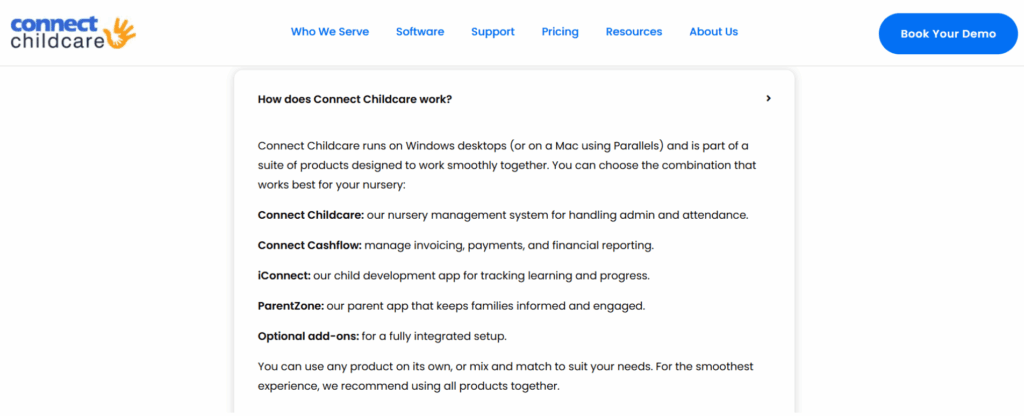
This tends to suit larger, established chains that value a long-tenured vendor, run a Windows-standard admin setup, and don’t currently need recruitment built in. It’s less likely to fit nurseries that need a flexible, browser-based system. We’ve written a full eyworks vs Connect Childcare side-by-side comparison covering all of this in more detail.
Single-purpose specialist tools
How each platform scores
| Test | eyworks | Famly | Ovivio | Connect Childcare |
|---|---|---|---|---|
| Built for UK early years | Strong (2) | Partial (1) | Partial (1) | Partial (1) |
| Priced for what you use | Strong (2) | Partial (1) | Limited (0) | Limited (0) |
| Covers the staffroom | Strong (2) | Partial (1) | Limited (0) | Partial (1) |
| Works across your whole team's devices | Strong (2) | Strong (2) | Strong (2) | Partial (1) |
| Grows in the direction you grow | Strong (2) | Partial (1) | Partial (1) | Partial (1) |
| Total (out of 10) | 10 | 6 | 4 | 4 |
eyworks, 10/10
Famly, 6/10
Ovivio, 4/10
Connect Childcare, 4/10
Which one fits your nursery
| If you are | Consider | Because |
|---|---|---|
| A single-site owner protecting cash flow, wanting to start small | eyworks | Pay only for the modules you need today, add more without a rip-and-replace |
| A nursery manager who needs rotas, ratios, and daily diaries to just work | eyworks | Core operational tools are standard, not gated behind a premium tier |
| A setting that needs every feature in a top tier anyway and has low staff turnover | Famly or Ovivio | A flat bundled fee may suit here. But it's worth comparing against eyworks' modular pricing, since paying per module can still work out cheaper even at full feature parity |
| A large, established chain that's comfortable with a Windows-based admin setup | eyworks or Connect Childcare | Deep experience with large multi-site groups, scalability, and detailed reporting tools |
| A team that needs to log in from Macs, tablets, and shared devices interchangeably | eyworks, Famly or Ovivio | Runs entirely in the browser, no Windows or Parallels dependency |
| A nursery whose only pain point is observations, happy to run separate systems elsewhere | eylog from eyworks or a specialist observation tool | Deep, focused functionality in one narrow area. eyworks gives you the option to add more later without switching systems |
| A group actively trying to solve the recruitment crisis, not just manage existing staff | eyworks | eyrecruit is the sector's only dedicated early years applicant tracking system |
Common questions about choosing nursery management software
Is eyworks cheaper than Famly or Ovivio?
It depends on which features your nursery actually uses. eyworks modules are priced individually rather than bundled into tiers, so you only pay for what you need. For example, a boutique 20-child setting that needs only invoicing and observations pays substantially less with eyworks than with Famly’s or Ovivio’s equivalent tier, because you’re not paying for HR or enquiry tools you don’t need.
Can I start with just one eyworks module?
Yes, eyworks is built to grow with your nursery. Many settings begin with a single module, such as eymanage or eylog, based on what they need most right now. You can then add other modules when the time is right.
Is eyworks better than Famly and Ovivio for my nursery?
For most nurseries, yes. eyworks is modular by design, so you can choose the tools you need now and add more as your setting grows. Each module works brilliantly alone and even better together, unlike the fixed tiers Famly and Ovivio sell.
How is eyworks different from Connect Childcare?
The most practical difference is architecture. Connect Childcare’s core admin software runs as a Windows desktop application, so Mac users need Parallels to access it, while eyworks runs entirely in the browser on any device. eyworks also includes a dedicated recruitment module, eyrecruit, which Connect Childcare doesn’t offer natively.
Does eyworks include recruitment software?
Yes, eyworks includes eyrecruit, a dedicated applicant tracking system built specifically for early years settings. eyworks is the only platform in this category with a native ATS built for the sector rather than a generic third-party add-on.
Is eyworks suitable for nursery groups and chains, not just single settings?
Yes. eyworks modules work together to give group directors clear, consistent reporting and oversight across every site. At the same time, individual settings retain the flexibility to adopt modules at their own pace.
See it against your own numbers
The clearest way to judge any of this is against your actual child numbers and priorities. Book a free demo and one of our product specialists will walk through it with you.