
eyworks vs Connect Childcare: a detailed comparison
Skip the reading?
Get a personalised demo based on your specific needs and priorities.
In brief:
The fundamental difference: bundles vs. building blocks
- Connect Childcare's core admin software runs as a Windows desktop application. Mac users need to install Parallels to use it. eyworks runs entirely in the browser and is accessible from any device with an internet connection.
- Connect Childcare offers a bundled product suite (Connect Childcare, iConnect, ParentZone, and Connect Cashflow) designed to be used together. eyworks is built on a true grow-with-you modular architecture, so you can adopt each module independently and only pay for what you use. Or get the full eyworks suite for an all-in-one solution.
- Connect Childcare does not have a native recruitment solution. eyworks includes eyrecruit, the only applicant tracking system purpose-built for the early years sector.
- Connect Childcare's pricing is quote-based. eyworks publishes per-child, per-module pricing on its website, so you can calculate your total cost before speaking to anyone.
A quick note on this comparison
The biggest architectural difference: cloud-native vs Windows desktop
Connect Childcare is partly desktop-based
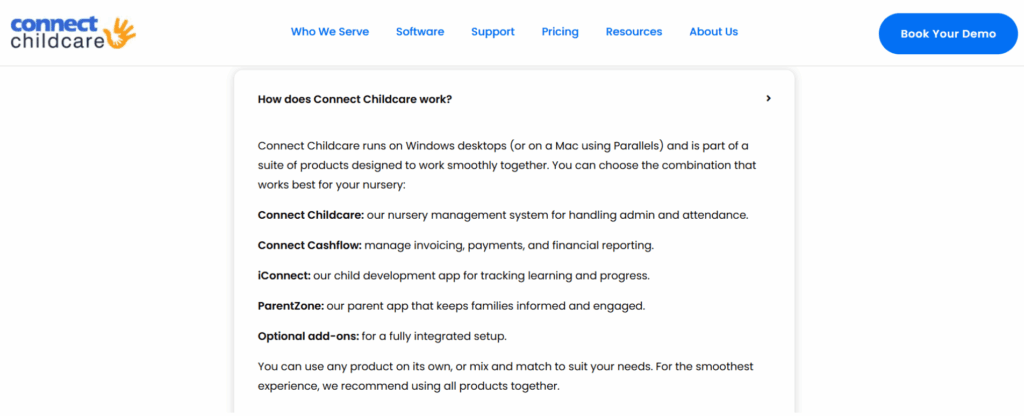
- Your office computers need to be running Windows or Macs with Parallels licences.
- Multi-site managers cannot simply log in from any device. They need the desktop client installed on the machine they want to use.
- IT requirements are higher than a pure browser-based system.
eyworks runs entirely in the cloud
| Aspect | Connect Childcare | eyworks |
|---|---|---|
| Main admin software | Windows desktop application | Browser-based |
| Mac compatibility | Requires Parallels (paid Windows virtualisation) | Native browser access |
| Device flexibility | Limited to installed machines | Any device with a modern browser |
| Admin software updates | Manual initiation | Automatic in the background |
| Practitioner observation app | iConnect (web) | eylog (web) + native tablet app |
| Parent app | ParentZone (mobile) | eyparent (mobile, included free) |
How the two platforms approach "all-in-one"
- The traditional bundled model: you commit to a recommended suite of products. You can technically use them in isolation, but the platform is designed and priced to work as a connected set. So, in practice, you may run into friction if you try to use individual modules on their own.
- The grow-with-you model: you choose individual software modules and add to them over time, within a single all-in-one platform. Every single module works reliably because eyworks was built around the core philosophy of giving nurseries maximum flexibility and autonomy.
Connect Childcare follows the bundled model
eyworks follows the grow-with-you model
Feature comparison
1. Recruitment
- Connect Childcare doesn’t have a native recruitment solution. To fill vacancies, you rely on external job boards, agencies, spreadsheets, or a separate applicant tracking system. None of the hiring data flows naturally into the rest of the platform. When you do hire someone, their information needs to be entered manually into the staff records.
- eyworks offers eyrecruit, the dedicated applicant tracking system for the early years sector. It posts to multiple boards (Indeed, GOV.UK, daynurseries.co.uk, and more), gives you a visual candidate pipeline, automates communication, captures safer recruitment evidence, and converts successful hires directly into staff profiles in eypeople.
| Key features | Connect Childcare | eyworks |
|---|---|---|
| Built-in recruitment | ✕ No native ATS | ✓ eyrecruit, purpose-built for early years |
| Sector specialism | Requires sourcing external, generic tools | Designed for the early years sector |
| Job posting automation | ✕ Relies on manual or external systems | ✓ One-click job posts to Indeed, GOV.UK, daynurseries.co.uk, and more |
| Candidate pipeline visibility | ✕ External or spreadsheet-based | ✓ Visual pipeline within the platform |
| Recruitment communication | ✕ Manual email follow-ups | ✓ Built-in automation |
| Safer recruitment evidence | ✕ Tracked separately | ✓ Captured within the hiring workflow |
| Hire-to-staff-record transition | ✕ Manual data re-entry | ✓ One-click conversion into eypeople |
| Primary focus | Managing existing staff | Hiring and staff management in one system |
2. Phased adoption
If you’re switching from spreadsheets, paper, or a competitor, the speed and disruption of the transition matter as much as the software itself.
- The Connect Childcare approach: Connect Childcare recommends using its suite of products together for the smoothest experience. The platform is built around the assumption that you will adopt Connect Childcare, iConnect, ParentZone, and Connect Cashflow as a coordinated set. While their products can be used in isolation, the design intent and pricing reward full adoption.
- The eyworks approach: You can start with one module, run it alongside whatever else you’re already using, and add other modules later. A nursery might begin with eyrecruit because hiring is the most pressing problem, add eylog three months later, then move finances over to eymanage when the timing is right. Each module is independently usable and deeply integrated with the others.
| Key features | Connect Childcare | eyworks |
|---|---|---|
| Adoption pattern | Recommended as a suite | ✓ Module by module, or all-in-one, based on your needs |
| Run alongside existing systems | Possible but limited | ✓ Designed to coexist with what you already have |
| Phased rollout | Less flexible | ✓ Easy phased rollout, one department at a time |
| Pay only for what you use | Bundled pricing | ✓ Per-module, per-child pricing |
| Adding new functionality later | Quote-based add-ons | ✓ Add a module when you need it, no contract renegotiation |
The result: Lower implementation friction. Your team learns one new system at a time rather than having to relearn every process at once.
3. AI for the early years
- The Connect Childcare approach: Connect Childcare doesn’t currently have a dedicated AI assistant tailored to early years writing or documentation.
- The eyworks approach: Aimey is our
AI assistant custom-built for early years
.
It helps practitioners and managers draft on-brand, sector-appropriate copy. It helps you write better observations, parent communications, and more. You can fix the tone, length and grammar with a single click, without leaving the platform. It’s important to note that Aimey is far more than just a sector-specific version of Copilot or ChatGPT. Aimey is also deeply integrated with other eyworks modules, so it can offer operational suggestions. For example, it can analyse your occupancy data, room ratios, and staff availability to recommend optimised staff rotas. Everything Aimey does is grounded in early years sector knowledge and tailored to your setting’s context.
| Aspect | Connect Childcare | eyworks |
|---|---|---|
| Dedicated AI assistant for early years | ✕ Not currently offered | ✓ Aimey, built for the sector |
| Writing observations and reports | Manual | ✓ Aimey assists with drafting |
| Integration with platform data | N/A | ✓ Aimey draws on context from eyworks modules |
| Scope of capability | N/A | ✓ Goes beyond writing assistance. AI-powered operational assistance and recommendations. |
4. Nursery finance
- Connect Cashflow functions primarily as a digital transactional gateway with an HMRC-linked TFC button. It helps you collect money, but the heavy lifting of cross-referencing bank statements, tracking down references, and clearing invoices remains a manual task for your admin team.
- eypay is a unified financial solution built directly into the eyworks platform. It handles payments seamlessly, but its true value lies in automating the entire post-payment reconciliation lifecycle while keeping your team in firm control.
| Key features | Connect Childcare (Connect Cashflow) | eyworks (eypay) |
|---|---|---|
| Core focus | Payment collection | ✓ Complete nursery finance automation |
| Automated bank feeds | ✕ No. Manual bank transaction exports and imports | ✓ Yes. eypay automatically pulls all transactions into your eymanage dashboard |
| Smart invoice matching | ✕ Manual matching required | ✓ Auto-suggests invoice matches using transaction amounts, dates, and reference codes |
| Reconciliation workflow | ✕ Manual data matching | ✓ One-click review and approval of auto-matched suggestions |
5. Security
Real-world scenarios
Scenario A: the modern single setting (30 children)
| Need | Connect Childcare | eyworks |
|---|---|---|
| Device flexibility | A Windows desktop is required for the admin | ✓ Any device with a browser |
| Mac users | Requires Parallels (extra licence cost) | ✓ Native browser access |
| Modules needed | Connect Childcare + iConnect + ParentZone | eymanage + eylog (eyparent is free) |
| Pricing approach | £150/month for full package | Published per-child pricing |
| Estimated monthly cost | £150/month | £70/month or £65/month paid annually |
Scenario B: the growing setting with recruitment need (60 children)
| Need | Connect Childcare | eyworks |
|---|---|---|
| Operational modules | Connect Childcare + iConnect + ParentZone | eymanage + eylog + eyenquiries + eypeople + eyrecruit (one vacancy) + eyengage |
| Recruitment | ✕ External ATS required (typical cost £300/month) | ✓ eyrecruit included |
| Employee and parent engagement | Connect Childcare doesn’t have a native, social media-style interactive newsfeed with features like polls, social posts, or mandatory notifications with granular targeting. | Included with eyengage |
| Posting jobs to boards | Manual or external | ✓ Automated posting |
| Hire-to-staff-record transition | ✕ Manual data entry | ✓ One-click conversion to eypeople |
| Estimated cost | £450/month (£150 for the Connect Childcare software + £300 for the external ATS) | £144/month or £133/month paid annually |
The result: When recruitment is a priority (and for most settings, it is), Connect Childcare’s lack of a native ATS means you end up paying for two systems and managing two data sources. eyworks gives you the full employee lifecycle in one platform.
Scenario C: a nursery chain with 5 sites, each caring for 30 children
| Need | Connect Childcare | eyworks |
|---|---|---|
| Centralised multi-site reporting | ✓ Strong, established | ✓ Built for groups |
| Operational modules | Connect Childcare + iConnect + ParentZone + Cashflow | eymanage + eylog + eyenquiries + eypeople + eyengage + eyrecruit (2 open roles) |
| Cross-site staff management | ✓ Staff Plan add-on | ✓ Included in eypeople with multi-site visibility |
| Modern, browser-based access for area managers | ✕ Windows desktop required for admin | ✓ Browser-based across all modules |
| Mac-using directors | ✕ Parallels workaround | ✓ Native browser access |
| Recruitment across sites | ✕ External ATS required | ✓ eyrecruit handles vacancies across the group |
| Employee and parent engagement | Connect Childcare doesn’t have a native, social media-style interactive newsfeed with features like polls, social posts, or mandatory notifications with granular targeting. | Included with eyengage |
| Modular adoption (rolling out site by site) | Less flexible | ✓ Phased rollout per site or per module |
| Estimated cost (5 sites, 30 children per site and 2 job postings) |
£1,050/month based on per-setting pricing on the Connect Childcare website
(£150/month per site for the suite, plus an estimated £300/month for an external ATS across the group) |
£640/month or £595/month paid annually. |
At a glance: the full comparison
| Feature | Connect Childcare | eyworks |
|---|---|---|
| Platform architecture | The main admin software is a Windows desktop application. iConnect (observations) and ParentZone (parents) are web/mobile. Mac users need Parallels. | 100% browser-based across every module. Works on any device with an internet connection. |
| All-in-one approach | Traditional bundled suite designed to be used together. Pricing rewards full adoption. | Modern grow-with-you modular. Adopt only the modules you need, when you need them. |
| Recruitment | ✕ No native ATS. External system required. | ✓ eyrecruit, the only ATS purpose built for early years. |
| Employee and parent engagement | ✕ Connect Childcare doesn’t have a parent and employee engagement module. | ✓ Included with eyengage |
| AI assistant for early years | ✕ Not offered. | ✓ Aimey, integrated across the platform. |
| Premium add-ons | Connect Cashflow, SMS Text Messages, and Postcode Lookups. | All core features are fully available with zero gated features. eypay and Aimey are paid add-ons that enhance the functionality of the core modules. |
| Nursery finance |
✓Connect Cashflow offers multiple payment options. ✕ No invoice reconciliation. ✕ No automated bank feeds |
✓eypay offers multiple payment options. ✓Automated bank feeds. ✓Smarter invoice reconciliation. |
| Implementation | Full replacement results in higher disruption. | Phased rollout. Migrate one module or one site at a time. |
| Multi-site focus | Built for both single settings and groups. | Built for both single settings and groups, with modular pricing. |
| Security | Cyber Essentials, Cyber Essentials Plus, PCI DSS, GDPR, and ISO-certified infrastructure. | Cyber Essentials Plus, PCI DSS, GDPR, and ISO-certified infrastructure. Both meet sector security expectations. |
The final verdict: which is right for you?
Connect Childcare is a good choice if:
- You’re an established nursery group or chain that values working with a long-tenured vendor with deep enterprise muscle.
- You’re comfortable with a Windows desktop environment for your admin team and don’t have Mac-using owners or area managers.
- You don’t need a recruitment solution, or you already have an external applicant tracking system you’re happy with.
eyworks is the better choice if:
- You want a truly modern, cloud-native platform: every module accessible from any device, with no Windows dependency, no Parallels workaround, and no installation requirements.
- You want minimal disruption when you switch: you can adopt eyworks one module at a time, run it alongside what you already have, and avoid the friction of replacing your entire tech stack in one go.
- You refuse to pay for what you don’t use: modular, per-child pricing means you only pay for the tools your setting actually needs today.
- You want a recruitment solution built for early years: eyrecruit is the only dedicated applicant tracking system designed for the sector. Recruitment is the biggest challenge most nurseries face, and we treat it as a core part of the platform rather than an afterthought.
- You want pricing transparency before you book a call: every module's cost is on our website, scaled to your child numbers.
- You want an AI assistant that understands the sector: Aimey is built specifically for early-years writing and integrated across the platform.
Read other nursery management software comparisons.